What is Spatial Mapping?
Spatial Mapping is how XR devices understand the physical world and their position within it. Using SLAM (simultaneous localization and mapping), augmented reality devices scan the environment using world cameras, depth cameras, and IMU sensors to understand the structure of the physical world (called a Sparse map), where the device is located within this digital structure (called Localization), and which direction is down (IMU gravity). Maps are sets of recorded location data that let the XR device know where it is, and the more location data there is, the better the chance of accurate localization.
Spatial mapping is essential for digital content placement, persistence, “pixel stick” (the ability of digital pixels to remain in a particular location regardless of where or how the user moves), and input. Spatial mapping and localization use highly complex systems and nomenclature, but without them, devices like the ML2 are nothing more than funny-looking computers worn on the head.
Responsibility:
UX Design Lead
Results:
The waypoint mapping experience, once released, saw immediate positive customer feedback. One of our largest customers, Lowes, which maps areas as large as 12,000 ㎡ said, “There was minimal loss of tracking issues and power cycles…nothing like before. The new ML Spaces is amazing…we all really enjoy the Dollhouse feature!” Another ISV developing an app for Amazon said, “The localization works amazingly well! Nice replacement for markers and way less work,” and VTT said, “... the UX is amazing, wish ML had started with that UX earlier.” Quality maps were consistently created, with time-to-completion averaging 60% less than previous mapping experiences; the larger the space mapped, the greater the time savings.
SLAM is a complicated process using algorithms, computations, and sensory data to create a map, but knowing what and how much to tell end users in order to properly scan an area required me to understand it myself first. Magic Leap has three software divisions that each specialize in visual perception, all spread out from California to Zurich. There was no single end-to-end device and sensor flow document that unified our SLAM system, so I spent several weeks interviewing experts and documenting how everything fit together.
To fully understand something, you have to write it down in your own words. I created my own interpretation of our SLAM system not only to understand it myself but also to help others. I’ve found that more engaging visuals increase the likelihood of engagement. This artifact was for internal employees only. It still feels good when employees at Magic Leap reach out and tell me, “They finally get it.” Nothing like democratizing technology.
Breaking it down
This was no easy project, and admittedly, I made mistakes along the way. We created an earlier mapping experience that was effective at producing quality maps, but users didn’t enjoy it, and the time to map was too long. Read the full story here.
To simplify user movements required to map an area, all we needed to do was to get users to stand up, walk around in a methodical manner, and get them to look in all directions, including up and down, all across the entire area that needs to be mapped. Users should spend more time in areas where they plan to use the AR device and avoid black, shiny, or mirrored surfaces. All of SLAM was boiled down into those steps.
Users needed to map areas ranging from small home offices of 2㎡ to large-scale warehouses of 13,000㎡. And the experience needed to effectively account for multi-story buildings, stairwells, and balconies.
Tools
We prototyped and tested a set of various tools, often using systems from video games, and tested those tools with internal users to see if they helped inform users, made them confident in their actions, and resulted in the proper user movements. These tools would eventually become the backbone of the entire mapping experience.
Environmental Mesh
A geometric mesh was displayed across the room geometry in case users wanted to scan for occlusion and/or physics. There were a few extra flourishes, such as waypoints colliding with the mesh to show a tight association between them and the mesh.
To reduce visual clutter and hide seams between sections, we visually simplified the mesh to a dot pattern.
Dollhouse
As a user maps an environment, the mapped 3D geometry is built in a location towards the lower FOV, called a dollhouse. The dollhouse provides a clear overview of what has been mapped and what has not, and instills confidence in users regarding their progress.
Audio
The speed at which a user moves their body and head needs to be at a “methodical” pace. Fast movements don’t allow the sensors to capture positional data properly, and overly slow movement results in user impatience. The audio team created an ambient music track that set a zen-like feeling to inform pace, with a multi-layer track that added complexity as the user progressed to better scan data.
Tutorial
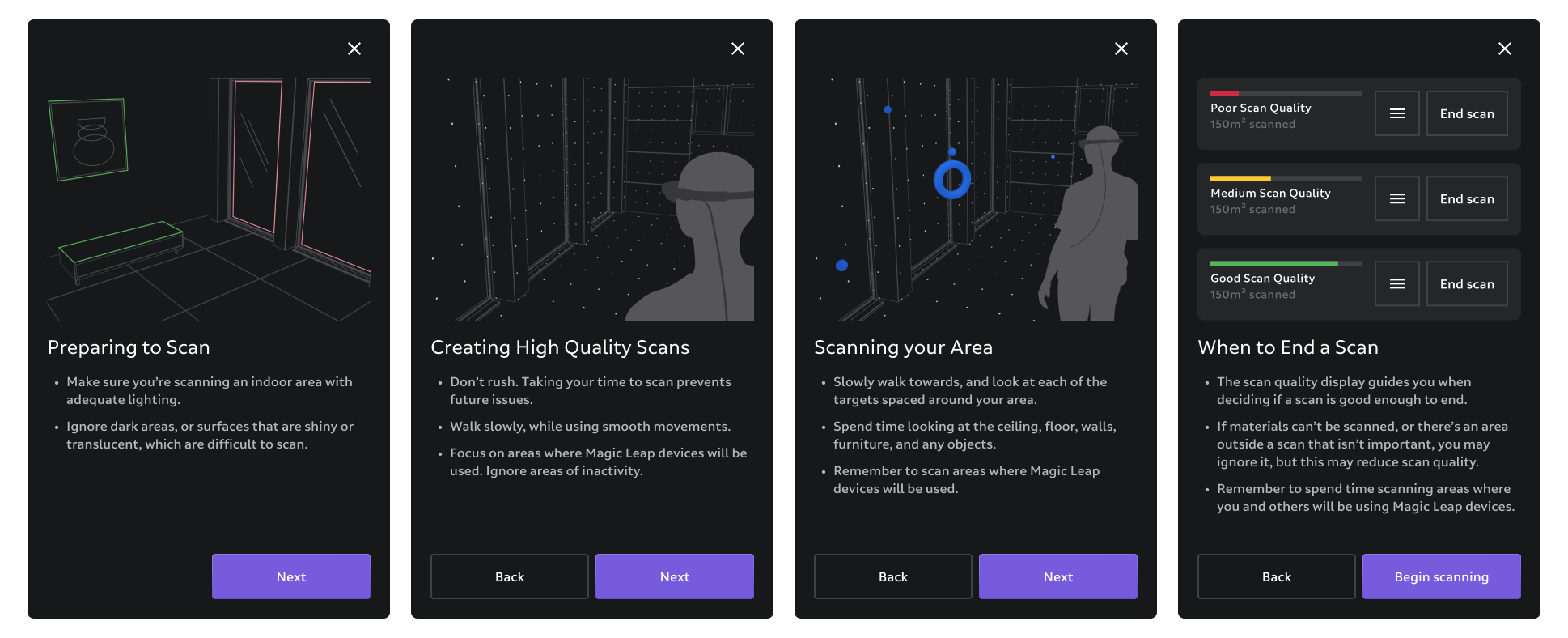
Tutorial screens for beginners explain the environment, how to create good scans, what to do and what to expect, when to end, and what types of areas to stay away from.
HUD
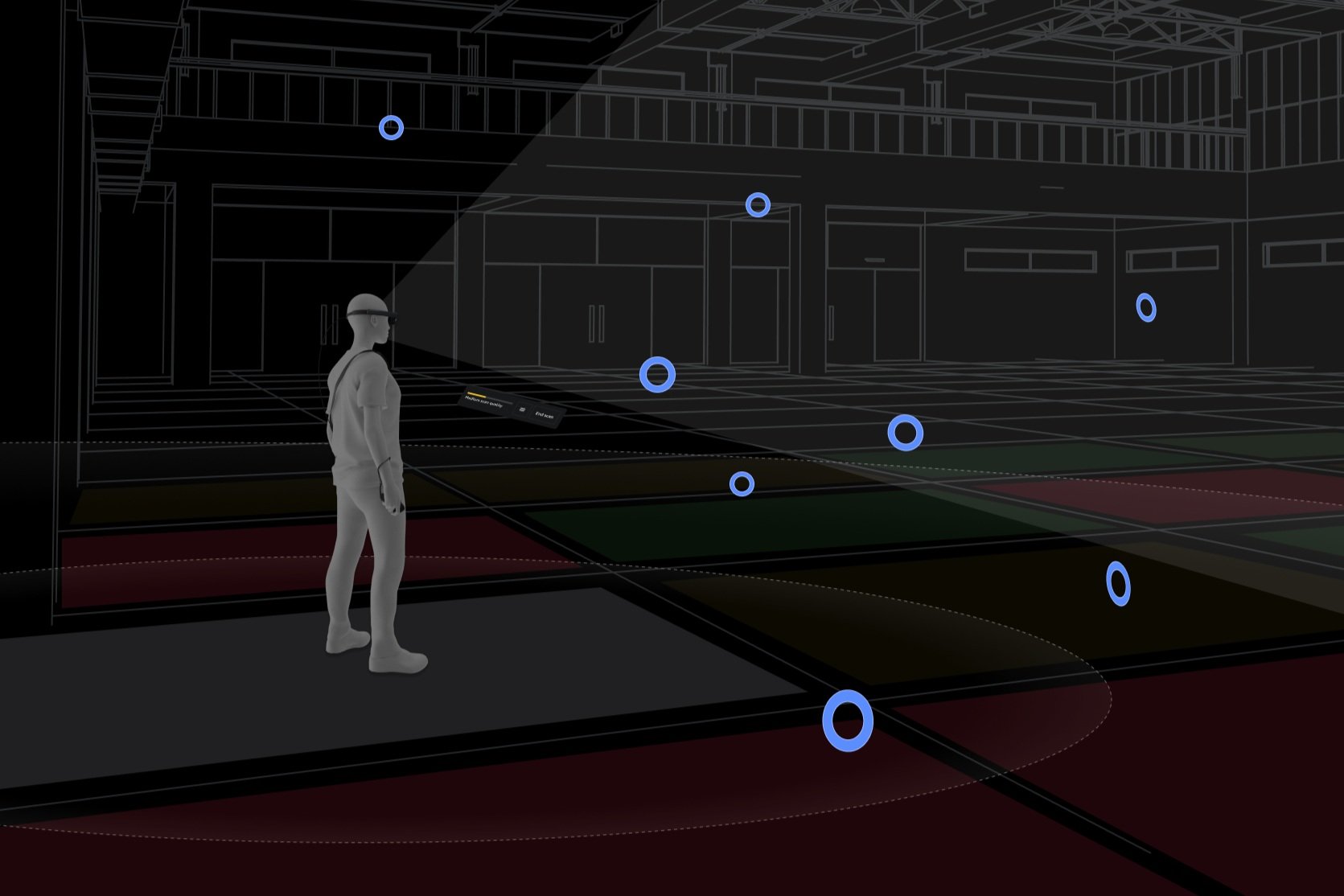
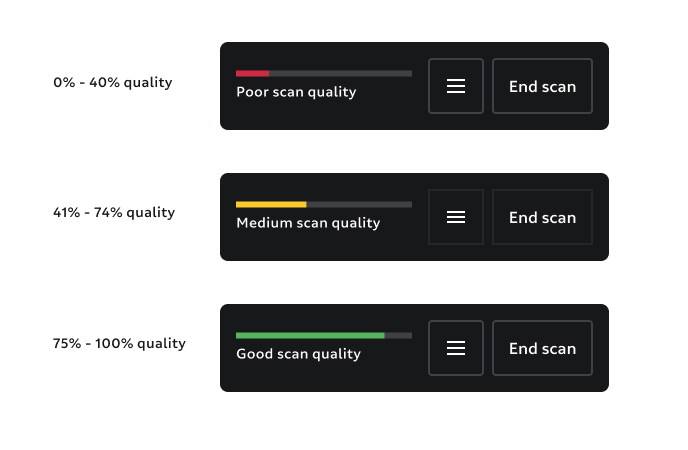
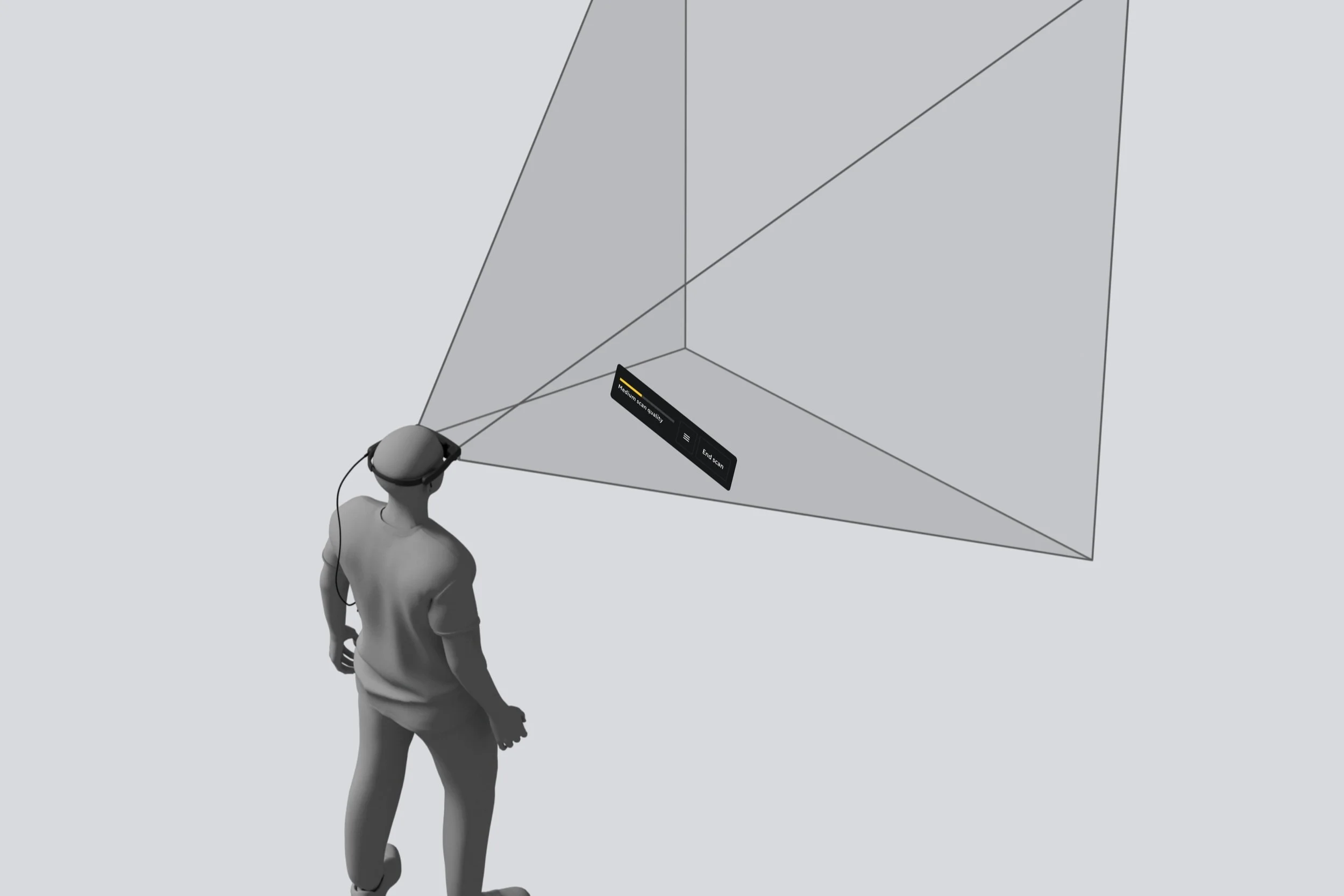
The heads-up display hovers in front of the user (head-relative behavior) in the lower field of the FOV. The low position in the FOV increases visibility of the physical world and waypoints, and the behavior allows users to easily look down to check progress. The physical world the device can sense is divided into 3-square-meter grids. A quality percentage is calculated from the average localization confidence and displayed in the HUD. This HUD quality indicator gave users the feeling of progress and indicated when they could end and save their map.
Waypoints
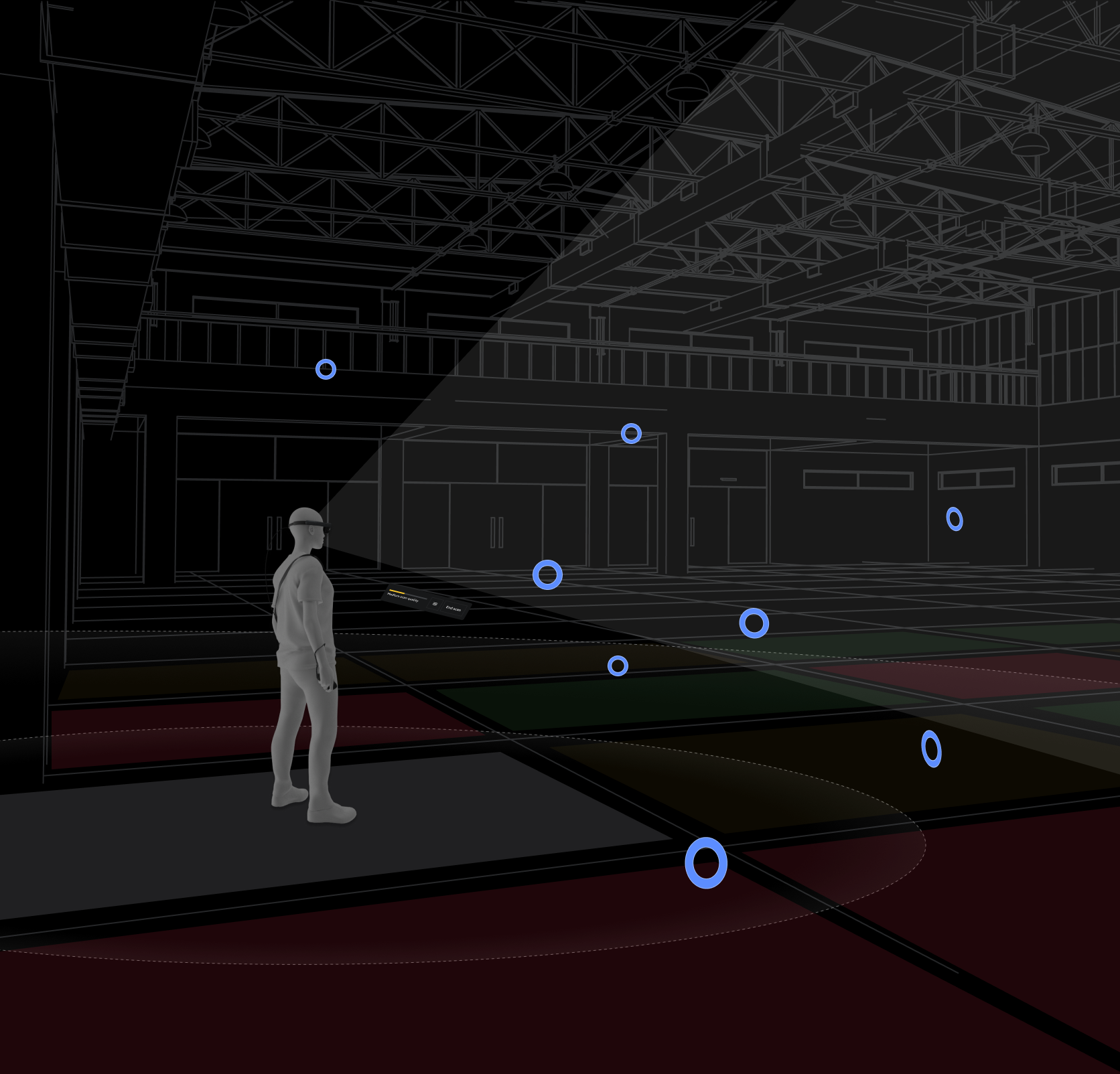
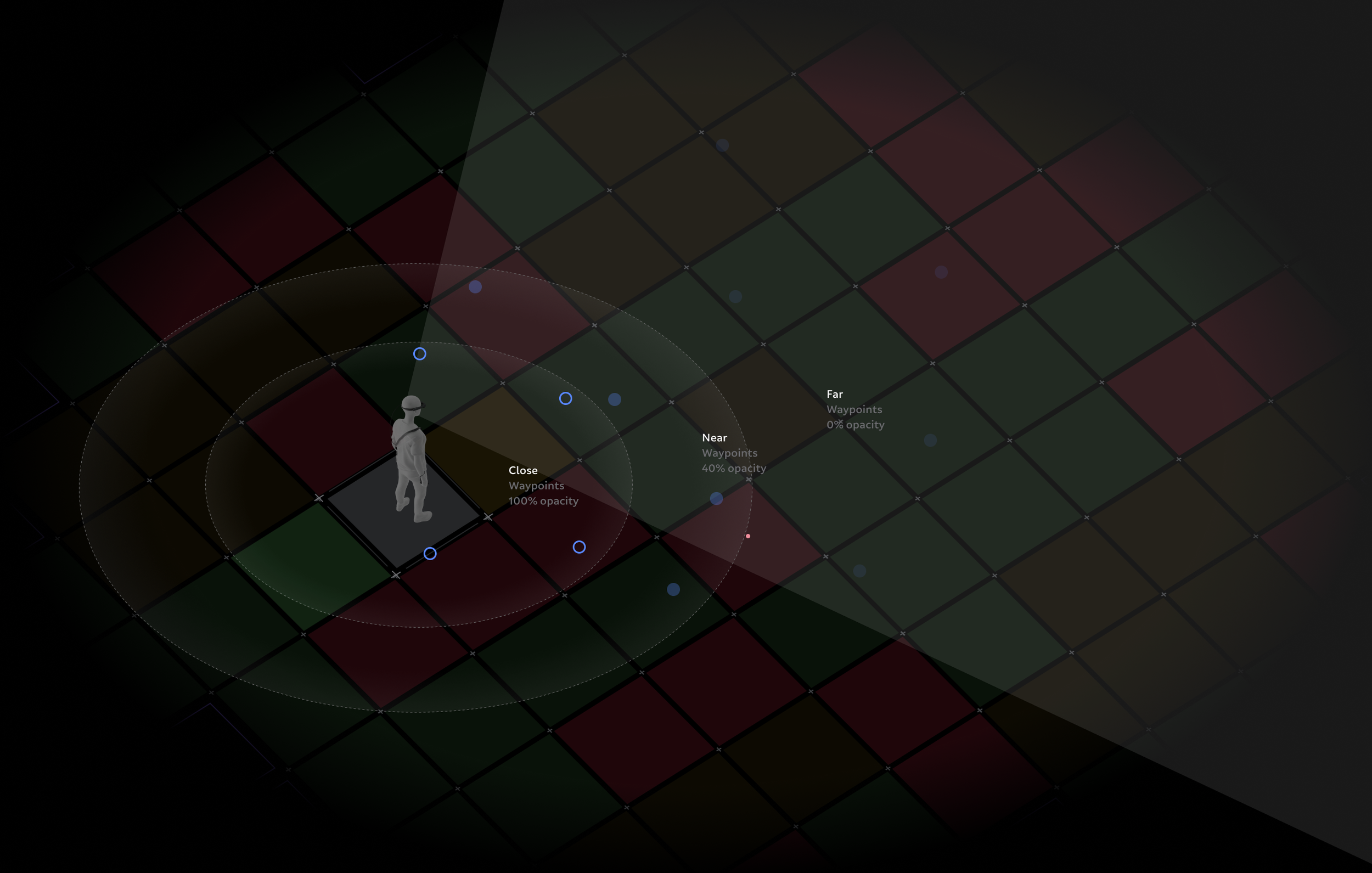
Waypoints are 3D targets that populate the known area and are used to attract users to look at and move closer to them. The floor is divided into 3㎡ grids, and each grid generates four waypoints placed at semi-random widths and heights. Waypoints begin as simple spheres, and as the user approaches, focuses on, and then stares at a waypoint, it provides visual and audio feedback about its state. Positional data is then recorded to produce a high-quality SLAM map. The final stage of a waypoint occurs when it is “destroyed,” shrinking and sinking into the mesh. The user then moves on to the next waypoint, and then the next. Users follow this breadcrumb trail in whatever movement pattern they choose.
When a user is within 5m of a Waypoint, it transitions from a blue sphere to a torus shape. This tells the user that they are close to a scan state.
The scan state begins when the user is within 2.5m of a Waypoint and focuses on it. For the positional data to be recorded correctly, the user must continue focusing on the Waypoint for 500 ms.
Once data is saved, the Waypoint sinks into the geometric mesh, indicating a symbiotic relationship between positional and mesh data.
The number of waypoints around a user can get overwhelming, so we implemented an opacity system that prioritizes waypoints closer to the user.
Refinement
To address areas that have low localization confidence, once a user selects the end of their mapping, the system would quickly analyze localization confidence across the entire mapped area. If confidence was high (86%), they could then save their map. But if confidence was low in any grid, we offered a “refine” stage. If selected, a 3D geometric dollhouse appeared in the lower FOV, showing red problem waypoints within the dollhouse to indicate where problem areas occur. Overlaid on the physical space, these same red problem waypoints would appear, prompting the user to clear them by navigating back to the problem area and scanning the problem Waypoints. Once all the problem Waypoints were cleared, the user ended the mapping session, and the device would localize to that map.
Hint System
An in-situ tutorial guided users through the experience for the first three mapping sessions. Voice-over and text hints led the user through the experience, giving general guidance.
Results

Quality Maps
Map quality was well within quality KPI goals with a mean localization success ratio of 90.25%.

Time-to-Task
The time it took for users to map a mid-size area was on average 30% less time than previous mapping experiences.

User Understanding
Users understood how to move, what areas to avoid, where they should spend more time mapping, and why they needed to perform certain functions to create a quality map.

Customer Satisfaction
Customers reported high satisfaction with the improved mapping flow and were less likely to ask for an alternative mapping integration.